Tip #1 - Search Engine Optimization | Tip #2 - Your E-Mail Signature
Tip #3 - Google Analytics | Tip #4 - Working on your Typing
Tip #1 - Search Engine Optimization
 It is estimated that 90% of all online traffic is achieved through the various search engines. If your Web site doesn’t have a page appearing in the top 10 search engine result positions, the chances of someone clicking on your listing, and actually visiting your site, are low. If you’re not in the top 20, the chances that someone will scan through the results and find your page, drops dramatically. Hence, Search Engine Optimization tries to help organize your page/site so that it will move up the Search Engine Results and thus be found.
Durham Web Services is pleased to offer you a FREE copy of the e-Book Search Engine Optimization Made Easy. Written by Brad Callen, a search engine optimization expert.
If you are serious about getting your website to the top of Google and the other major search engines this e-Book is a must read.
This is an 90-page e-Book complete with graphics telling and showing you how to optimize your web pages in order to get high rankings on Google and other search engines.
Techniques taught include:
• The secret to getting listed on Google in under 24 hours
• Don't get your website banned by Google... by accident
• Possibly the biggest misconception about ranking well in the search engines
• How changing one simple on-page optimization factor can boost your rankings by over 350 positions
• and much, much more!
We have included an e-Book for you which will guide you the process of optimizing your website called "Search Engine Optimization - Made Easy".
 Also, do you have meta tags on all your pages of your website? They are very important in describing the content of your website and for search engine ranking. Use the meta-tag generator script to help you create your very own for your website.
< Back to Top of Page
Tip #2 - Your E-Mail Signature
Here are some tips on creating your email signature!
Signatures are useful for providing important contact information for the people you communicate with on the Internet. If used wisely, they can also be effective ways of marketing yourself or your company.
Some things to think about:
- Provide your email address. Do not assume that just because your email address can be found in the header of the message, it will be found. Many people who are new to the Internet may not know the common places to find this information. But there is one place where they will expect to find this, in your signature.
- Provide your website address and put "http://" in front of it. Since almost all current email clients will turn text with "http://" into a clickable link, this makes it easier for your correspondents to connect to your site.
- Provide your real world address and phone numbers. Your correspondents will frequently need this, particularly in a business situation. Having the information in your signature, automatically appended to your email messages, is a very handy thing.
- Provide a marketing message. Set up your signature so that it conveys a little about your company. Your email signature can and should function as a virtual business card.
An amazing product that you might like to try, Plaxo, helps you create your signature and make it more visually pleasing. There are many great features including keeping up-to-date information on all your contacts and more. Learn more at www.plaxo.com.
< Back to Top of Page
Tip #3 - Google Analytics
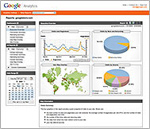 Google Analytics is the new free statistics service by Google that allows you to track the visitors to your web site in hundreds of different ways. Google Analytics tells you everything you want to know about how visitors found your site and how they interact with it.
Google Analytics gives us an opportunity to invest in our advertisers and everyone else who wants to create quality content on the web. Instead of spending money on web analytics, you can focus on creating targeted, marketing campaigns and on improving your site design and content.
Learn how visitors interact with your website and identify the navigational bottlenecks that keep them from completing your conversion goals. Find out how profitable your keywords are across search engines and campaigns. Pinpoint where your best customers are from and which markets are most profitable to you. Google Analytics gives you this and more through easy-to-understand visually enhanced reports.
Get Google Analytics for your website, at Google Analytics.
< Back to Top of Page
Tip #4 - Typing
 With how popular technology is in today's world, it is interesting to note that many people who use the computer on a regular basis do not know how to type correctly. The fact is the computer can take up a lot of one's time at work, school and/or home and that improving your typing skills can significantly improve your efficency.
Try this typing tool to test your strengths in typing and find out what your skill level is.
For details tutorials on proper typing, visit Peter's Online Typing Course.
< Back to Top of Page